Create a file to export of AP Vendor payments for a selected Financial Period.
| Access |
| Grant permission to User Profiles in Access User Profiles > select a User Profile > Security > Accounts Payable > Menu Security > Reports > Payment Register. |
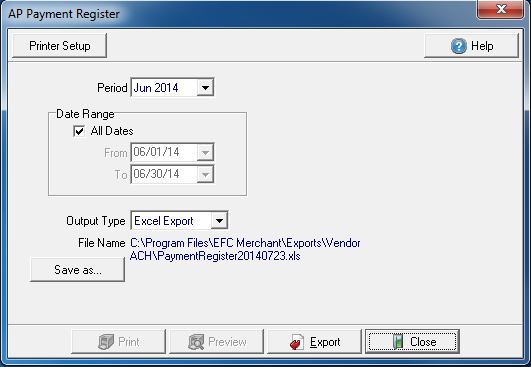
Create Your Report
The Period field defaults to the previous period. Click the drop down list to select an alternate Financial Period.
All Dates selected by default in Date Range. Create a date range by using the drop down calendar in both the From and To fields.
Choose how this report will be exported by selecting an Output Type.
- Excel Export- Create an Excel spreadsheet
- Printer- Send the report to the default printer.
Select the location to save the exported report using the Save As button.
Select  to generate the report to the Output Type of Excel.
Select Preview to view the report onscreen.
Select Print to send the report directly to the default printer.
View a sample report here.