Access Bad Driver License Register
Track bad checks received from customers by requiring a drivers license when settling orders and batches or making an AR payment. With this new functionality, when customers settle orders or make a payment by check, the information captured has been expanded to include the Driver License Number and the State of issue and can be viewed in Setup > Access Cash Drawers > Transactions. When information of a bad check is received, add the driver license associated to the Bad Driver License Register found on the AR menu.
| Functionality |
| Available if enabled by navigating to Merchant Ag FIN and selecting Require Drivers License # with Checks found in Admin > Installation > Access Parameters > AR > Customers > General tab. |
| Access |
| Grant permission to User Profiles in Access User Profiles > select a User Profile > Menu Security > Accounts Receivable > Main Menu > Access Bad Driver License Register. |
Choose a Status of checks to view, All, Accept or Decline and click  .
.
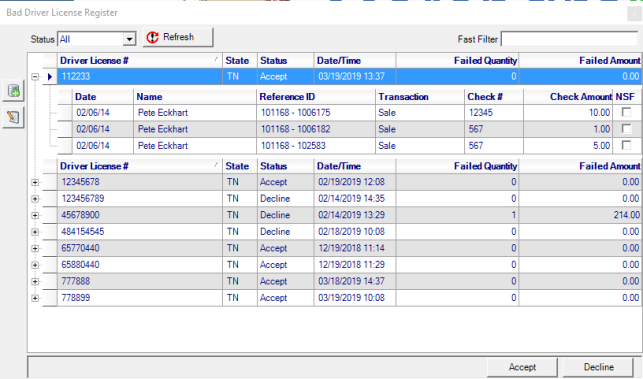
The following fields will populate the grid with previously recorded Driver licenses.
- Driver License # in numeric order
- State, the two letter abbreviation of the state issuing the license
- Status displays the current ability to accept checks, Accept or Decline
- Date/Time of when the Bad Driver License grid was updated
- Failed Quantity indicates the number of checks that are marked NSF
- Failed Amount provides the total of checks that are marked as NSF.
Use the plus sign to the left of the Driver License # to view expanded transaction information.
- Date of each individual check
- Name on the customer account
- Reference ID indicates the Customer ID and Order number
- Transaction will ind
- Check #
- Check Amount
- NSF checkbox
Add a Driver License
Use  to add a Driver License Number to the Register.
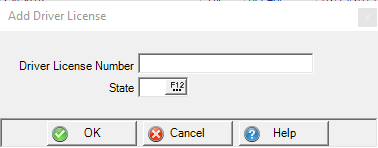
In the Driver License Number field, enter up to 20 alpha-numeric characters.
Enter the two letter State abbreviation or select F12 to search. Click OK to complete the process which also retrieves payments made by check for the Driver License from Cash drawer.
Click OK to complete adding a driver license. The information on Cash Drawer > Transactions will populate with check information when the driver license matches.
Flag a check as NSF
Expand the checks listed associated with a driver license number by clicking the plus sign to the left of the DL number. Use the checkbox in the NSF column to indicate a bad check. This indicates a bad check but does not prevent additional checks associated with the DL from being accepted.
Decline All Check Payments for a Driver License
All checks associated with a Drivers License can be declined by highlighting the License in the grid and clicking the Decline button in the lower right hand corner of the register. A warning message will appear when an order, batch or customer payment is made by check and the Drivers license is recorded in the register. Update the Drivers License to allow checks by highlighting the Drivers license and click Accept.