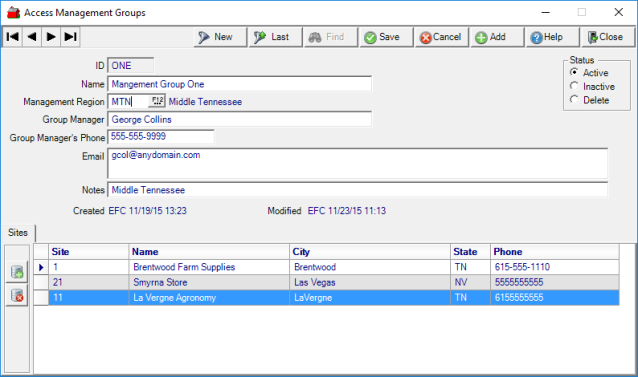
Create Management Groups, a method of grouping Locations, also known as Sites, together. Management Groups can be created then added to a Management Region. Search for an existing Management Group by clicking Find or click Add to create a new Management Group.
| Access |
|
Grant permission to User Profiles in Access User Profiles > select a User Profile > Security > Setup > Access Management Groups. |
Click  to create a new Management Group.
Select  to create a new Management Group.
Enter a four character ID in this alpha-numeric field.
Create a Name for the Management Group in this 50 character alpha-numeric field.
Associate the Management Group with a Management Region by entering the Management Region ID or select F12 to search.
Include any additional information in these optional fields.
Enter a name for a Group Manager in this 50 character alpha-numeric field.
Group Manager Phone contains a phone number in this ten character numeric field.
Separate Email addresses using a comma or semi-colon in this 150 character alpha-numeric field.
Notes contains up to 80 characters in this alpha-numeric field.
Sites
Use  to add a line to the Sites grid. Add a Site by entering the Site ID or use F12 to search.
 will delete the selected Site.